1. On registering a new card, if you write down a topic and try to find it in topic dictionary and no matching one exists, this unknown keyword is transferred into attribute "Create new topic" down in the Topic dictionary window.
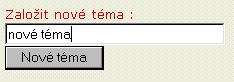
Note: a topic is created in a dimension corresponding to input attribute, you have entered unknown keyword and clicked Topic Dictionary icon
 .
.New topic is created in this dimension (it cannot be seen from other dimensions) and will be transferred back into the input attribute.
Note: New topic can be created only from the RForm (Registration form).
2. Click Create new button.
3. This topic is displayed in topic list above.
4. By clicking Asssign button this topic is transferred back into the input attribute and ended with a semicolon character.
